




 AI, Governance & Automation
AI advisors that guide teams through everyday work
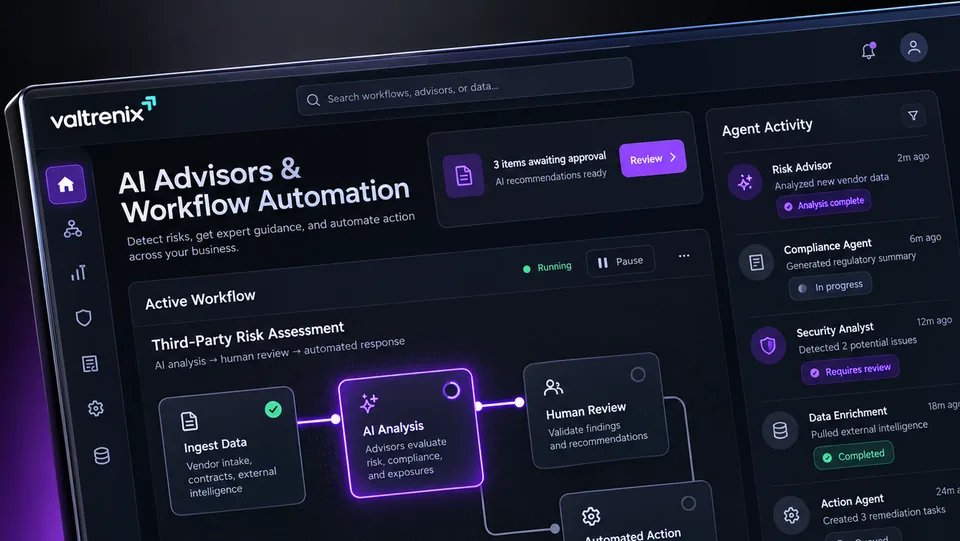
Give teams a conversational assistant and guided workflows for routine tasks. Outputs are suggestions that your people check and own.
Expert knowledge is hard to reach when it is needed
Teams lose time hunting for answers, repeating the same questions and rebuilding the same documents. Experts become bottlenecks because routine guidance has no easier route.
Generic chat tools are not tied to a defined process, so results vary by who asks and how. Guided workflows add structure, so the same task is approached the same way each time.
Capabilities at a glance
- Conversational assistanceAsk questions in plain language and get drafted answers that you can verify and refine.
- Guided workflowsStep through a defined task in order, with prompts that keep the work consistent between people.
- Task-focused advisorsUse assistants set up around a specific purpose, such as a security, sales, academic or strategy task.
- Drafting supportGenerate first drafts of summaries, responses and documents for a person to edit and approve.
- Structured outputsCapture results in a consistent format so they can be reviewed and reused.
- Review checkpointsPlace approval steps in a workflow so a named person confirms before work moves on.
From first input to a reviewed decision
Each advisor is scoped to a purpose and a workflow. The assistant helps with the steps, and a person confirms the result.
- 01
Define the purpose
Choose the task, audience and boundaries for the advisor. This keeps answers focused and relevant.
- 02
Guide the task
The user works through prompts or asks questions in conversation. The advisor drafts content and next steps.
- 03
Review the output
A responsible person checks the draft against what they know and corrects it. Nothing is final until they accept it.
- 04
Complete and reuse
Approved outputs are saved in a consistent form. Teams can reuse good workflows for similar tasks.
Where teams apply it
Security guidance
An analyst asks for help drafting an incident summary or a control explanation. A senior reviewer checks it before it is shared.
Sales preparation
A sales team drafts account research notes and follow-ups. Reps edit the content before anything reaches a customer.
Academic support
A training team builds study guides and practice material. Instructors review accuracy before learners see it.
Strategic planning
A leadership group structures options and questions for a planning session. Executives decide what to adopt.
What it helps your team do
Faster first drafts
Teams start from a draft instead of a blank page, saving effort on routine writing.
Consistent approach
Guided workflows help different people follow the same steps.
Less expert bottleneck
Routine questions can be answered first by an advisor, leaving specialists for harder problems.
Review stays built in
Checkpoints keep a responsible person involved before outputs are used.
Questions we are often asked
Can the advisors be wrong?
Yes. AI can produce errors or incomplete answers. That is why outputs are drafts that a responsible person must check before use.
Do the advisors act on their own?
No. They suggest and draft. Actions and decisions stay with the people who use them.
Do you support voice and multiple languages?
Language and input options are confirmed during scoping. Tell us what your users need and we will confirm what can be supported.
Which systems can it connect to?
Integration options depend on your environment. We confirm what is supported for your setup in a demo or scoping call rather than assuming it.
How is our data protected?
Hosting, data handling and access controls are reviewed with you during scoping so answers reflect your specific requirements.
Is it a replacement for staff?
No. It supports people with drafting and guidance, and the work remains theirs to review and approve.
Works well alongside

AI-Powered Risk Management
Structure risk work from context to reporting, with AI-assisted drafts that your accountable people review before anything is recorded.
Explore AI-Powered Risk Management
Governance, Risk & Compliance
Organize policies, controls, gaps and evidence in one place, with AI-assisted drafting that accountable owners review and approve.
Explore Governance, Risk & Compliance
AI Risk Intelligence
AI-assisted analysis that helps your team make sense of risk information and set priorities, with people reviewing and deciding.
Explore AI Risk Intelligence